
Vue.jsでTableのデータをドラッグ&ドロップで選択する
Vue.jsでドラッグ&ドロップを利用してTableのデータを選択するプログラムに挑戦してみました!
今回はVue3、Nuxt3、TypeScriptの組み合わせで実装しています。
下記コマンドでインストールします。
npx nuxi init my-nuxt3-project
cd my-nuxt3-project
npm install
※この記事は2024/07/28時点の情報です。
components/DraggableTable.vue
// components/DraggableTable.vue
<template>
  <div>
    <table>
      <tbody>
        <tr v-for="(row, rowIndex) in tableData" :key="rowIndex">
          <td
            v-for="(cell, cellIndex) in row"
            :key="cellIndex"
            :class="{ selected: isSelected(rowIndex, cellIndex) }"
            @mousedown="startSelection(rowIndex, cellIndex)"
            @mouseover="updateSelection(rowIndex, cellIndex)"
            @mouseup="endSelection"
          >
            {{ cell }}
          </td>
        </tr>
      </tbody>
    </table>
  </div>
</template>

<script lang="ts" setup>
import { ref } from 'vue';

const tableData = ref([
  ['A1', 'B1', 'C1'],
  ['A2', 'B2', 'C2'],
  ['A3', 'B3', 'C3']
]);

const selecting = ref(false);
const selectedCells = ref<{ row: number, col: number }[]>([]);
const startCell = ref<{ row: number, col: number } | null>(null);

const startSelection = (row: number, col: number) => {
  selecting.value = true;
  startCell.value = { row, col };
  selectedCells.value = [{ row, col }];
};

const updateSelection = (row: number, col: number) => {
  if (!selecting.value || !startCell.value) return;
  const [startRow, startCol] = [startCell.value.row, startCell.value.col];
  selectedCells.value = [];
  for (let r = Math.min(startRow, row); r <= Math.max(startRow, row); r++) {
    for (let c = Math.min(startCol, col); c <= Math.max(startCol, col); c++) {
      selectedCells.value.push({ row: r, col: c });
    }
  }
};

const endSelection = () => {
  selecting.value = false;
  if (selectedCells.value.length > 0) {
    const rows = selectedCells.value.map(cell => cell.row);
    const cols = selectedCells.value.map(cell => cell.col);
    const uniqueRows = Array.from(new Set(rows)).sort((a, b) => a - b);
    const uniqueCols = Array.from(new Set(cols)).sort((a, b) => a - b);
    alert(`Selected Rows: ${uniqueRows.join(', ')}\nSelected Columns: ${uniqueCols.join(', ')}`);
  }
};

const isSelected = (row: number, col: number) => {
  return selectedCells.value.some(cell => cell.row === row && cell.col === col);
};
</script>

<style scoped>
table {
  border-collapse: collapse;
  -webkit-user-select: none;
  -moz-user-select: none;
  -ms-user-select: none;
  user-select: none;
}

td {
  width: 50px;
  height: 50px;
  border: 1px solid black;
  text-align: center;
  cursor: pointer;
}

td.selected {
  background-color: lightblue;
}
</style>
pages/index.vue
// pages/index.vue
<template>
  <div>
    <DraggableTable />
  </div>
</template>

<script lang="ts" setup>
import DraggableTable from '~/components/DraggableTable.vue';
</script>
以下が実行結果です。ドラッグ&ドロップでバッチリ選択されました!
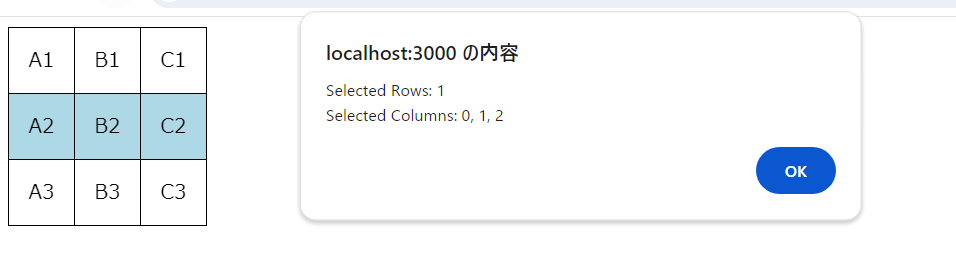
これで基本的なドラッグ&ドロップでセルを選択するTableの実装が完了です。
このサンプルコードでは、セルをドラッグして選択すると、選択されたセルが青くハイライトされ、
ドラッグが終了した時に選択中の行と列がアラートで表示されます。
今回のサンプルプログラムは理解できましたか?

難しいと思ったら、いろいろ自分で試してみて少しずつ理解を深めてみてくださいね! それにしてもポンコツ2人組は相変わらず理解できていないようですね・・・