条件によってDataGridのセルを変化
今回はC#のWPFで条件によってDataGridのセルを変化させるプログラムにポンコツ2人組が挑戦してみました。 バインドしているデータの値によってセルにコンボボックス、または文字列を表示するプログラムです。 WEBだと数行でやれることがC#だと以外に面倒な印象を受けました。初心者には敷居が高めかもしれません。 開発環境はVisualStudio2019を使用しています。 C#初心者が制作したものなのでいろいろとおかしい部分が多いと思います。プログラムを流用する際は適宜修正してください。
MainWindow.xaml
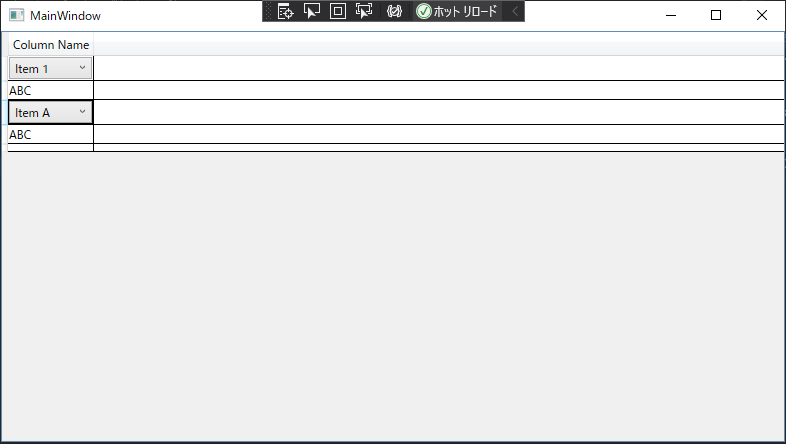
今回のテーマとなるDataGridを配置しています。バインドしているIsTrueの値がTrueの場合は
セルにコンボボックスを表示し、Falseの場合は"ABC"という文字列を表示します。
BoolToValueConverterを用いてバインドしている値を判定しているのが今回のポイントです。
<Window x:Class="WpfApp11.MainWindow"
        xmlns="http://schemas.microsoft.com/winfx/2006/xaml/presentation"
        xmlns:x="http://schemas.microsoft.com/winfx/2006/xaml"
        xmlns:d="http://schemas.microsoft.com/expression/blend/2008"
        xmlns:mc="http://schemas.openxmlformats.org/markup-compatibility/2006"
        xmlns:local="clr-namespace:WpfApp11"
        mc:Ignorable="d"
        Title="MainWindow" Height="450" Width="800">
    <Window.Resources>
        <local:BoolToValueConverter x:Key="BoolToValueConverter" />
    </Window.Resources>
    <Grid>
        <DataGrid x:Name="dataGrid" AutoGenerateColumns="False">
            <DataGrid.Columns>
                <!-- コンボボックスを表示するテンプレート列 -->
                <DataGridTemplateColumn Header="Column Name">
                    <DataGridTemplateColumn.CellTemplate>
                        <DataTemplate>
                            <ContentControl>
                                <ContentControl.Content>
                                    <MultiBinding Converter="{StaticResource BoolToValueConverter}">
                                        <Binding Path="IsTrue" />
                                        <Binding Path="ComboBoxItems" />
                                    </MultiBinding>
                                </ContentControl.Content>
                            </ContentControl>
                        </DataTemplate>
                    </DataGridTemplateColumn.CellTemplate>
                </DataGridTemplateColumn>
            </DataGrid.Columns>
        </DataGrid>
    </Grid>
</Window>
MainWindow.xaml.cs
サンプルデータを用意して、DataGridにバインドしています。
using System;
using System.Collections.Generic;
using System.Linq;
using System.Text;
using System.Threading.Tasks;
using System.Windows;
using System.Windows.Controls;
using System.Windows.Data;
using System.Windows.Documents;
using System.Windows.Input;
using System.Windows.Media;
using System.Windows.Media.Imaging;
using System.Windows.Navigation;
using System.Windows.Shapes;

namespace WpfApp11
{
    /// <summary>
    /// MainWindow.xaml の相互作用ロジック
    /// </summary>
    public partial class MainWindow : Window
    {
        public MainWindow()
        {
            InitializeComponent();

            // ダミーデータを作成
            List<DataItem> items = new List<DataItem>
            {
                new DataItem { IsTrue = true, ComboBoxItems = new List<string> { "Item 1", "Item 2", "Item 3" } },
                new DataItem { IsTrue = false, ComboBoxItems = null },
                new DataItem { IsTrue = true, ComboBoxItems = new List<string> { "Item A", "Item B" } },
                new DataItem { IsTrue = false, ComboBoxItems = null },
            };

            dataGrid.ItemsSource = items;
        }

    }
}
DataItem.cs
サンプルデータをセットするためのクラスです。
bool型の項目とList型の項目を持っています。
using System;
using System.Collections.Generic;
using System.Linq;
using System.Text;
using System.Threading.Tasks;

namespace WpfApp11
{
    public class DataItem
    {
        public bool IsTrue { get; set; }
        public List<string> ComboBoxItems { get; set; }
    }
}
BoolToValueConverter.cs
引数で受け取ったbool型の値がTrueの場合はコンボボックスのコントローラーを返し、
Falseの場合は"ABC"という文字列を返すコンバータークラスです。
また、コンボボックスに表示するリストも引数で受け取り、コンボボックスにセットしています。
using System;
using System.Collections.Generic;
using System.Globalization;
using System.Linq;
using System.Text;
using System.Threading.Tasks;
using System.Windows.Controls;
using System.Windows.Data;
using System.Windows;

namespace WpfApp11
{
    public class BoolToValueConverter : IMultiValueConverter
    {
        public object Convert(object[] values, Type targetType, object parameter, CultureInfo culture)
        {
            try
            {
                bool isTrue = (bool)values[0];
                List<string> comboBoxItems = (List<string>)values[1];

                if (isTrue)
                {
                    ComboBox comboBox = new ComboBox();
                    comboBox.ItemsSource = comboBoxItems;
                    return comboBox;
                }
                else
                {
                    return "ABC";
                }
            }
            catch (Exception ex)
            {
                Console.WriteLine("Converter error: " + ex.Message);
                return DependencyProperty.UnsetValue; // エラーが発生した場合はデフォルトの値を返す
            }
        }


        public object[] ConvertBack(object value, Type[] targetTypes, object parameter, CultureInfo culture)
        {
            throw new NotImplementedException();
        }
    }
}
以下がアプリケーションを実行した画面です。