
Vue.jsでTable間のデータをドラッグ&ドロップで入れ替える
Vue.jsでドラッグ&ドロップを利用して複数のTable間のデータを入れ替えするプログラムに挑戦してみました!
今回はVue3、Nuxt3、TypeScriptの組み合わせで実装しています。
下記コマンドでインストールします。
npx nuxi init my-nuxt3-project
cd my-nuxt3-project
npm install
次にドラッグ&ドロップを簡単に実装できる「vuedraggable」をインストールします。
npm install vuedraggable@next
※この記事は2025/10/28時点の情報です。
components/TableComponent.vue
<template>
  <div class="table-wrapper">
    <h3>{{ title }}</h3>

    <div class="table-container" :style="{ width: tableWidth + 'px' }">
      <!-- ヘッダー部分(同じ colgroup を使用) -->
      <table class="data-table header-table" aria-hidden="true">
        <colgroup>
          <col :style="{ width: (col1Width + 1) + 'px' }" />
          <col :style="{ width: (tableWidth - col1Width - 2) + 'px' }" />
        </colgroup>
        <thead>
          <tr>
            <th>列1</th>
            <th>列2</th>
          </tr>
        </thead>
      </table>

      <!-- 明細部分(スクロール) -->
      <div class="table-body-container" :style="{ height: `calc(var(--row-height) * 15)` }">
        <table class="data-table body-table" role="grid">
          <colgroup>
            <col :style="{ width: col1Width + 'px' }" />
            <col :style="{ width: (tableWidth - col1Width) + 'px' }" />
          </colgroup>

          <!-- vuedraggable を tbody の中に入れて、table の構造を崩さない -->
          <draggable
            :list="localItems"
            group="shared"
            item-key="id"
            @change="onChange"
            tag="tbody"
          >
            <template #item="{ element, index }">
              <tr>
                <td class="idx-cell">{{ index + 1 }}</td>
                <td class="item-cell">{{ element.name }}</td>
              </tr>
            </template>
          </draggable>
        </table>
      </div>
    </div>
    <div class="footer-note">
      <!-- 表示例の件数表示(任意) -->
      <small>Items: {{ localItems.length }}</small>
    </div>
  </div>
</template>

<script setup lang="ts">
import { ref, watch, defineProps, defineEmits } from 'vue'
import draggable from 'vuedraggable'

interface Item {
  id: number
  name: string
}

const props = defineProps<{
  title: string
  items: Item[]
  tableWidth?: number // px 単位(任意)
  idxColWidth?: number // index 列の幅(px)
}>()

const emits = defineEmits<{
  (e: 'update:items', value: Item[]): void
}>()

// Props のデフォルト値
const tableWidth = props.tableWidth ?? 200
const col1Width = props.idxColWidth ?? 40

// ローカルな配列(親と同期させる)
const localItems = ref<Item[]>([...props.items])

watch(
  () => props.items,
  (v) => {
    // 親側が items を差し替えたときにローカルを更新
    localItems.value = [...v]
  }
)

watch(localItems, (newVal) => {
  emits('update:items', newVal)
})

const onChange = (evt: any) => {
  // 必要ならここで移動時の追加処理を行う
  // console.log('changed', evt)
}
</script>

<style scoped>
:root {
  --row-height: 36px;
}

.table-wrapper {
  display: inline-block;
  margin: 10px;
  vertical-align: top;
  border: 1px solid #ccc;
  border-radius: 6px;
  padding: 8px;
  background: #fafafa;
  box-sizing: border-box;
}

/* 親コンテナの幅は inline style で指定 */
.table-container {
  box-sizing: border-box;
}

/* 共通テーブル設定 */
.data-table {
  border-collapse: collapse;
  table-layout: fixed;
  width: 100%;
  box-sizing: border-box;
}

/* ヘッダー用テーブル (thead のみ) */
.header-table th {
  border: 1px solid #999;
  background-color: #ddd;
  padding: 6px;
  text-align: center;
  height: var(--row-height);
  box-sizing: border-box;
}

/* 明細表示部分の外枠(スクロール) */
.table-body-container {
  overflow-y: auto;
  overflow-x: hidden;
  border-left: 1px solid #999;
  border-right: 1px solid #999;
  border-bottom: 1px solid #999;
  box-sizing: border-box;
  max-height: calc(var(--row-height) * 15);
}

/* 明細テーブルのセル */
.body-table td {
  border-collapse: collapse;
  border-top: 0; /* 上の罫線は外枠で表現 */
  border-bottom: 1px solid #999;
  padding: 6px;
  text-align: center;
  height: var(--row-height);
  box-sizing: border-box;
  background-color: #fff;
}

/* index 列と item 列の見た目調整 */
.idx-cell {
  padding-left: 4px;
  padding-right: 4px;
}

.item-cell {
  padding-left: 4px;
  padding-right: 4px;
  text-overflow: ellipsis;
  overflow: hidden;
  white-space: nowrap;
  border-left: solid 1px #333333;
  cursor: pointer;
}

/* hover */
.body-table tr:hover {
  background-color: #eef;
}

/* 注釈 */
.footer-note {
  margin-top: 6px;
  text-align: right;
  font-size: 12px;
  color: #666;
}
</style>
pages/index.vue
<template>
  <div>
    <h2>ドラッグ&ドロップでテーブル間の要素を入れ替え</h2>
    <div class="tables-container">
      <TableComponent
        v-for="(table, idx) in tables"
        :key="idx"
        :title="table.title"
        v-model:items="table.items"
        :tableWidth="221"
        :idxColWidth="50"
      />
    </div>
  </div>
</template>

<script setup lang="ts">
import { reactive } from 'vue'
import TableComponent from '~/components/TableComponent.vue'

interface Item {
  id: number
  name: string
}

interface TableData {
  title: string
  items: Item[]
}

const tables = reactive<TableData[]>([
  { title: 'Table 1', items: Array.from({ length: 10 }, (_, i) => ({ id: i + 1, name: `データ ${i + 1}` })) },
  { title: 'Table 2', items: [{ id: 101, name: 'サンプル' }, { id: 102, name: '見本' }, { id: 103, name: 'テストデータ' }] },
  { title: 'Table 3', items: [{ id: 201, name: '気ままな' }, { id: 202, name: '2人組' }] },
  { title: 'Table 4', items: [{ id: 301, name: 'ポンコツ男子' }] },
  { title: 'Table 5', items: [{ id: 401, name: 'ポンコツ女子' }] },
])
</script>

<style scoped>
.tables-container {
  display: flex;
  flex-wrap: wrap;
  gap: 16px;
}
</style>
以下が実行結果です。ドラッグ&ドロップで各テーブル間の要素を入れ替えできました!
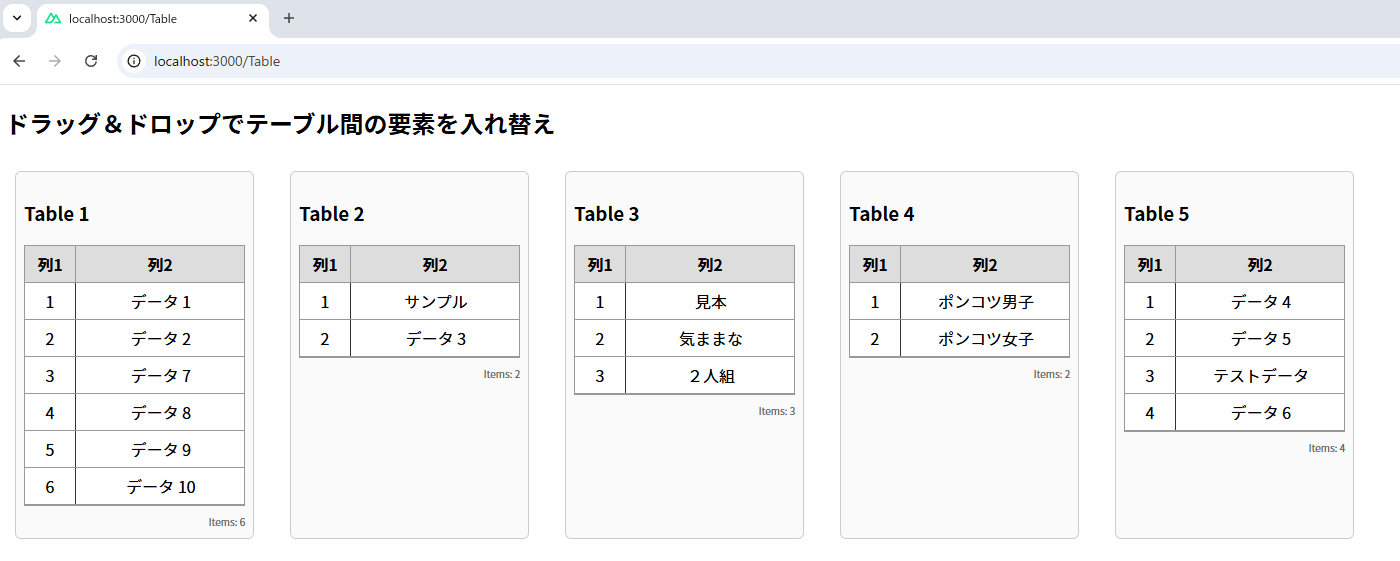
以上でテーブルの要素を複数のテーブル間でドラッグ&ドロップで入れ替えする処理が実装できました。
どうでしょう?今回のサンプルプログラムは理解できましたか?

よく分からなかった場合は、いろいろ自分で試してみて少しずつ理解を深めてみてくださいね! それにしてもポンコツ2人組は相変わらず理解できていないようですね・・・